


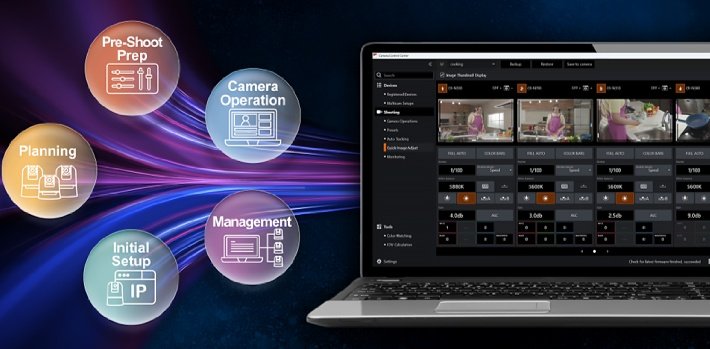
Canon has announced that they will begin offering “Camera Control Centre”, a free application for computers that supports the entire workflow for supported Canon remote cameras. This includes deployment and initial setup, colour matching, operation, and maintenance management, in early January 2027, as the company has claimed in a statement.


As video production equipment becomes more diverse and skilled technical personnel remain in short supply, production sites increasingly need more efficient workflows. Designed for everyone involved in video production using Canon remote cameras, this application looks forward to supporting deployment, initial setup, colour matching, operation, and maintenance management in a single application. It also supports Canon digital cinema cameras, professional digital video cameras, and remote camera controllers (available functions vary by model).
Operation across workflows
Canon has offered four applications to streamline camera management and operation at video production sites:
- Camera Search Tool for initial setup.
- Remote Camera Control Application for PTZ control and recalling presets.
- Multi-Camera Management Application for firmware updates and configuring various camera settings.
- Camera Colour Matching Application for generating and sending LUTs and matching colours by automatically detecting colour charts and comparing their colours.
By integrating these applications into one, users no longer need to switch between different applications for each process or purpose. This aims to enable seamless operation across workflows and contributes to greater operational efficiency.
New features
In addition to integrating the functions provided by the existing applications, new features further expand the range of use cases.
FOV Calculation
This new function simulates the angle of view before shooting based on the Canon remote camera model and the distance to the subject.
It allows users to consider equipment selection and camera placement for a given application in advance, with the intention of making proposal development and studio design more efficient.
Multicam Setups
This is designed to save settings for multiple cameras, including image quality settings, by scene and recall them when the same setup is used again.
Quick Adjustments
It enables intuitive adjustment of settings such as shutter speed, white balance, and iris while comparing video from up to four cameras.
Image quality adjustments that previously had to be made using the controller for each camera can therefore be performed efficiently on a single screen when operating multiple cameras.


Comments are closed